
emscripten setup
NOTE: Use a nightly openFrameworks build for Emscripten. There is no separate Emscripten zip. The nightly page is also linked from the download page. 0.12.1 is the stable desktop release and is not the Emscripten source to start from.
Have you ever made a project in openFrameworks and been like "This is awesome! I want to put it on my online portfolio!". You could always make a video or take photos, but what about the UI aspect of your project? How can people see the awesome mouse effects you made? Enter Emscripten. Emscripten translates your C++ code into Javascript code in a matter of minutes! So you can put your awesome OF project "on the line" in your portfolio.
These instructions compile one example. The same commands work for another project. They work on Linux and on Windows Subsystem for Linux.
Install Emscripten
From the openFrameworks directory, install the Emscripten SDK and the prebuilt libraries:
scripts/emscripten/install_emscripten.sh
scripts/emscripten/download_libs.sh
install_emscripten.sh uses the system package when it can (Homebrew on macOS, apt on Linux, winget on Windows). Pass any argument to clone emsdk instead. That path installs the version pinned in the script. On current master that pin is 6.0.13. ./emsdk install latest can move past the version openFrameworks is built against.
After a source install, load the SDK into the shell:
source emsdk/emsdk_env.sh
A package install puts emcc on the PATH for you. A source install needs that source line in each new shell, or the equivalent lines added to your shell profile.
Note: If you have a previous install of emscripten you will want to delete the compiled code in your OF_FOLDER. Delete any files or obj folders inside of OF_FOLDER/libs/openFrameworksCompiled/lib/emscripten/ and any obj/ folders in your project folders before trying to compile.
Compile an openFrameworks project using emscripten
Open the terminal in in one project in the examples folder, like examples/3d/3DPrimitivesExample, and compile the project using this command
emmake make
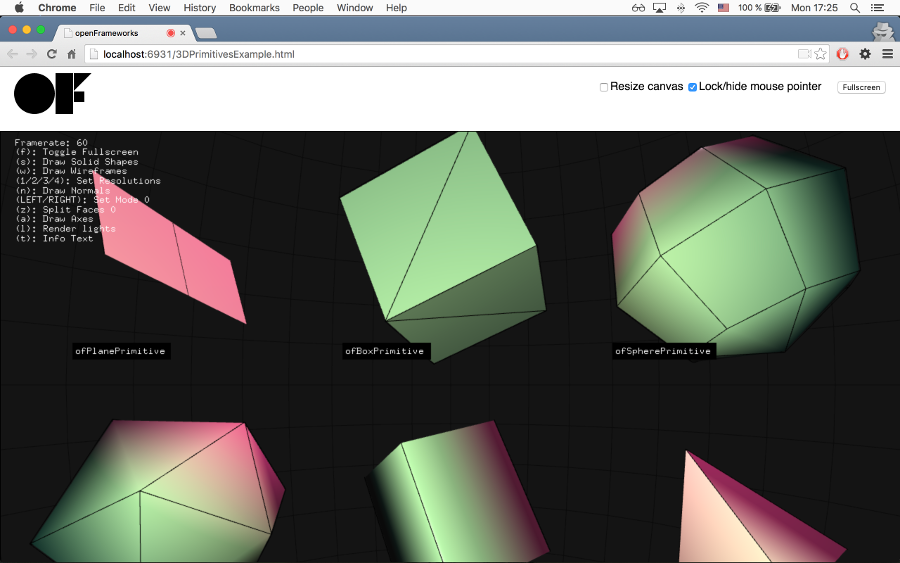
Once the compilation is finished, there will be a new file in examples/3d/3DPrimitivesExample/bin/3DPrimitivesExample/, the index.html file. Open this file with the command:
emrun bin/3DPrimitivesExample/
If it does not work, it might need a different browser like Firefox.
emrun --browser firefox bin/3DPrimitivesExample/
If everything works, you should see this image
This Tutorial is taken from this blog post by Regine Flores Mir.